NerdWorldNJ will set you up with a Free FTP Account.
|


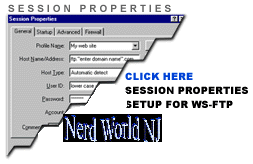 |
Host Name = ftp.yourdomain.com (for those with your own domain names) or nerdworldnj.com (for those with extensions off the nerdworldnj domain name) User Name = (contact us and we will let you know) Password = (select your own and let us know) |
|
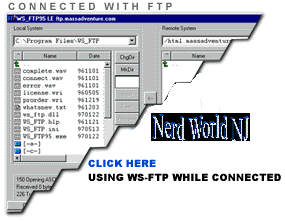 |
Left Side - your LOCAL (Hard Drive) Files Right Side - your files on OUR computer |
5. To GET your files to your computer click on the files on the right and then click the right mouse button and choose DOWNLOAD (There are also other methods such as pressing the up or down arrows on the tool bar)
6. To move your files to our computer from yours click on the file then right click the mouse and choose UPLOAD
7. To create a directory; click on the make directory icon on the tool bar (upper right)
8. To delete a file (careful); click on the delete files icon on the tool bar (upper right)
For page creation we recommend Microsoft Frontpage
TROUBLESHOOTING:
For Macintosh using Fetch
For Windows using WSFTP
For Windows using CuteFTP
IMPORTANT NOTES:
 | BACKUP All files FIRST! |
| When logging in always use all lowercase For those who FTP to " ftp.yourdomain.com " |
| All file names and paths MUST be lowercase |
| A reference to files in html must be lowercase |
| Your first page must be called index.html or index.htm |